

At some point, many folks will move away from the Customer Identity approach they’ve been using so far. Migrating to any Customer Identity and Access Management (CIAM) solution is a strategic initiative that can transform the way businesses manage customer access, authentication, and security, while at the same time delivering a more seamless experience for users.
Perhaps migration follows a decision to retire an in-house legacy solution with a move to a 3rd-party (SaaS) offering, embracing not just the benefit of a more up-to-date approach but also the additional Access Management benefits a modern CIAM solution can provide. In my previous article, I covered various viewpoints from a build-it-yourself CIAM perspective in a little more detail:
Or perhaps, the decision is based on a desire to move to a different CIAM provider; a first-choice SaaS solution may not always turn out to be the best option in the long run, for a variety of reasons. Risk of lock-in, pricing changes, or lack of innovation from a provider — particularly if your business is expanding into new regions requiring compliance with specific privacy laws — may all be contributing factors for moving away from your existing 3rd-party CIAM solution.
For many, for whatever reason, the topic of migration will sooner or later come to the fore; whether retiring a custom-built approach, switching 3rd-party SaaS provider, or refactoring a DIY deployment, there will undoubtedly be customer identity information that needs to move across to the new solution.
My name’s Peter Fernandez, and in this article, I’m going to discuss the things you’ll want to consider when making a Customer Identity (and Access Management) migration of your own.
Migration At A Glance
In true TL;DR fashion, in the table below, I’ve attempted to summarise migration options based on the type of approach you may be looking to take. If you’re viewing on a mobile device, you’ll want to rotate (to a landscape orientation) to get a better view 😁.
Migration is not just about the technical process of moving data; it involves maintaining customer trust, ensuring the continuity of service(s), and balancing business objectives with user experience, all of which I’ll talk more about throughout this article.
When adopting a Phased Approach, Just-In-Time Migration and Bulk Migration can be used in a mutually inclusive manner, and depending on the CIAM platform you are migrating to, some combination of each will typically be available.
| Migration | Big-Bang Approach | Phased Approach |
|---|---|---|
| Systems Migration | ✅ | ✅ |
| Just-In-Time User Migration | ✅ | |
| Bulk User Migration | ✅ | ✅ |
| User Credential Migration | ✅ | ✅ |
| User Account Migration | ✅ | ✅ |
| User Session Migration | ✅ | ✅ |
Migration Strategies
There are essentially one of two mutually exclusive strategies that can be taken when it comes to migration; whichever you choose, allowing yourself sufficient time to comprehensively test across your particular landscape will be critical to achieving a successful outcome:
Big-Bang Approach
As its name might suggest, this typically refers to the approach of doing everything all at once — system migration and user migration (et al) all within a short timeframe, and switching the user experience effectively “at the press of a button.”
Many folks think that the Big-Bang approach also means that a concentrated effort will result in nothing further when it comes to Customer Identity migration. However, if you also subscribe to its namesake, i.e. the “Big-Bang Theory” of Existence, then you’ll know that even the Universe continued to expand after the initial event!
Having worked with several large and small-to-medium enterprises on migrations to and from the Auth0 platform over the years, I can say with some degree of certainty that the Big-Bang approach is the most risky and rarely works smoothly in anything but the most simple of cases.
If you have one or two applications and a handful of users to migrate, then the approach may work well enough; in such scenarios, perhaps even foregoing user migration — as in getting your users to re-register— may be an acceptable course of action. However, in my experience, the chances of “Big-Bang” success decline exponentially as the complexity of a migration increases.
There are times, though, when a Big Bang approach is the only option. If you have a tight deadline — such as moving from one CIAM platform vendor to another, and the cost of running two systems side-by-side is prohibitive — then you have little choice. In these situations, as ever, being forewarned is forearmed, so here are the key areas to which you should pay particular attention:
- Communicate early to your Customers to let them know what is happening, and that there may be some upcoming disruption. Whilst this is advisable whichever strategy you adopt, it is arguable even more relevant when taking a Big Bang approach; see the section below for more regarding this.
- Pay particular attention to CIAM SaaS Provider particulars when refactoring your systems: Big-Bang migration will typically be from one CIAM (SaaS) provider to another, so your customer-facing applications should already be compliant with OIDC (OpenID Connect) Authentication workflows, etc. You may even be using OAuth 2.0 workflows for protecting your APIs. However, whilst these workflows are standards-based, each CIAM provider will likely have subtle nuances when it comes to their implementation, and there will always be aspects that may not be capable of being migrated; feature-parity and gap analysis between your new and existing CIAM provider is critical. See the section here for more on this.
- Pay particular attention to CIAM SaaS Provider limitations when exporting data: some vendors intentionally limit data export options for security reasons or to discourage migration. For example, whilst Auth0 offers Bulk Export from a user profile perspective, only certain information can be exported using it. Password hashes, for example, require a different approach, which will typically involve contacting Auth0 technical support and necessitate authorization that can take time to obtain. More on User migration is discussed in the section below. It is therefore crucial to assess how much identity data can be extracted in a usable form, and where you may need to elicit customer input (such as following a password reset process or engaging with some re-enrollment mechanism or another).
- Prefer the Bulk approach when migrating Users: taking the Big-Bang approach is often the case because time is of the essence. So the luxury of JIT (Just-In-Time) migration when it comes to your customer data is something that one can ill afford. If you have a lot of users, then a Bulk transfer operation from one provider to another will likely take some time — particularly as most 3rd-party SaaS CIAM vendors will employ platform restrictions (such as rate-limiting); again, see below for more details. You will want/need to be proactive in coordinating the transfer process with each CIAM vendor, and will also likely need to write some transfer glue-logic too.
- Monitor operation post migration: watching for anomalies in authentication behaviour is something that should be performed for any post-migration strategy, but particularly so when taking a Big-Bang approach. The early detection of any abnormalities will help you address technical issues and user experience issues in a timely manner. Again, the section below provides more details regarding this.
Phased Approach
In anything other than the edge-case situation(s) described above, the use of a Phased Approach should be preferred when it comes to customer identity migration.
As the name would suggest, a phased approach allows a migration to be performed in a controlled and measured way, over a number of phases and a time period where users can be moved in cohorts and/or applications refactored one at a time.
During my time working with customer identity migrations at Auth0, the phased approach to migration was by far the most successful — even in what one would consider to be the simpler use case scenarios.
For situations involving a move away from legacy implementation, the phased approach to migration is typically the recommended one. Depending on your CIAM provider of choice, a phased approach will enable the use of both JIT — Just-In-Time — and Bulk Migration from a user perspective; unlike the Big-Bang vs Phased strategies, Bulk and JIT user migration is not mutually exclusive, so both can be potentially used if desired.
Again, as with a Big-Bang approach, it is important to pay attention to the details: legacy systems often contain hardcoded business rules that must be replicated or adapted as part of the migration, and moving from a fully controlled in-house CIAM solution to a 3rd-party managed service can require a cultural shift in IT and security team practices.
The benefit of using a phased strategy for migration is that it provides the lead-time to clarify and document existing workflows, address any technical debt, carefully plan attribute mappings, run pilots with a subset of users to validate assumptions, and more.
Non-legacy CIAM migrations will also benefit more from a phased strategy, as subtle differences between the old provider and new provider integration (differences that may cause issues not immediately apparent or identified, even after due diligence) can be handled methodically and without time being a more pressing concern over the user experience.
Systems Migration
Once you’ve decided on your migration strategy, arguably, the next thing you’ll want to consider is how the integration of a new CIAM solution will affect your application systems.
For instance, if application(s) have been directly handling the ID and Password credentials of your users, then this is going to change; moving from a legacy system to a 3rd-party CIAM solution will typically involve Authentication via an OIDC workflow, where token validation replaces validating credentials directly.
For legacy systems that are migrating to OIDC-compliant workflows, there is a temptation to utilise the Resource Owner Password (ROP) Grant/Flow as defined by the OAuth 2.0 spec. This is not a recommended best-practice approach and should be avoided.
Authentication by token validation is a very different mechanism from the direct validation of credentials, so code changes will almost certainly be necessary. How extensive these changes might be will depend on your existing implementation, and will likely require the updating, replacing and even the introduction of new SDKs.
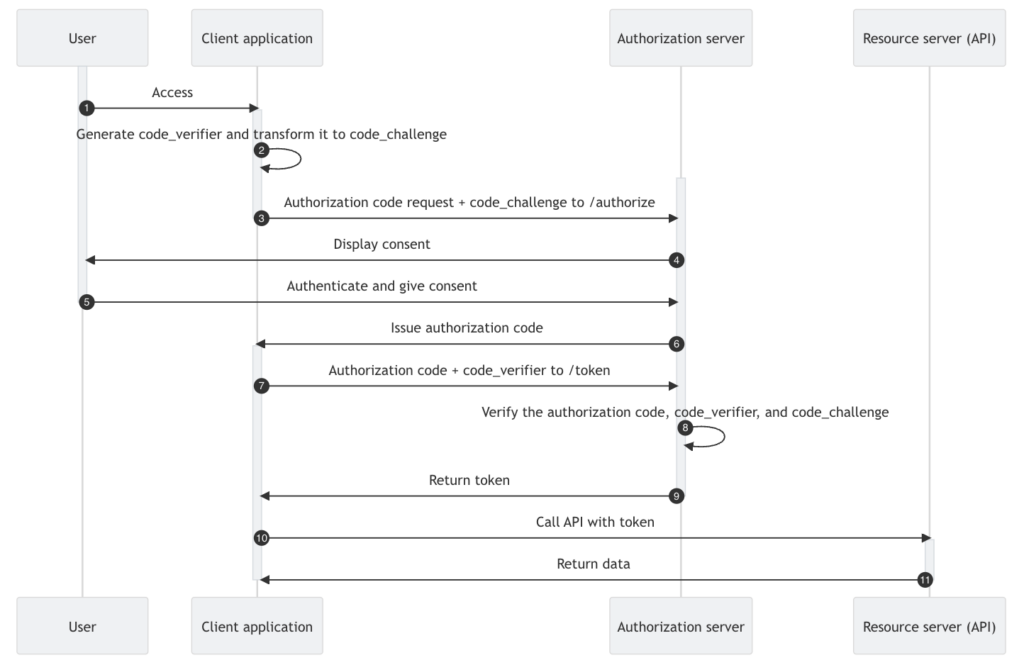
Making such changes may inadvertently create potential security vulnerabilities; integrating OIDC and or OAuth 2.0 into a SPA, for example, via Authorization Code Flow — the recommended approach, particularly where browser-based applications are concerned — may open up susceptibility to attack via XSS if you are not aware of the necessary precautions that must be taken. My recent article provides some more insight into this particular challenge:
It is unlikely that any vendor SDK you’re currently integrating with will work with your new provider. In my experience, vendor-specific SDKs typically make assumptions based on the vendor’s specific platform that do not translate when moving to another provider.
Even if your application(s) are already OIDC compliant, migrating to a new CIAM solution can still pose a number of challenges.
Depending on the CIAM solution you are migrating to, Client IDs and Secrets may need to be regenerated if they can’t be securely migrated. This, in turn, may have a knock-on effect, especially in B2B scenarios where federated integrations (particularly those using SAML) will typically need to be reestablished with your new CIAM provider.
With SAML integrations that support B2B SaaS Federation, old trust relationships will also need to be revoked and new ones established. Re-establishing trust with these third-party identity providers (IdPs) is essential, and certificate rollover/endpoint updates need to be carefully managed.
B2C scenarios are also not immune, as the likes of any Social identity providers currently being used will almost certainly need to be updated, too.
Existing implementation may also be making assumptions based on the current CIAM provider integration. For example, existing implementations may have made assumptions about the names and/or naming conventions being used for things like API endpoints.
Whilst OIDC authentication workflow is subject to standards definition, the specs don’t necessarily mandate specific API endpoint names; your existing CIAM provider and your new CIAM provider may use names that are very different and incompatible.
For OIDC-compliant workflows, at least, the preference should be to use the Discovery document — typically available via the .well-known endpoint (discussed here in more detail).
Automated processes, as well as integrations with logging subsystems and the like, may be relying on service account identities — as in non-user identities and utilising Client Credentials workflow — that will need to be identified and addressed as part of the migration process. Failure to do so may result in unplanned downtime or the inadvertent loss of audit/tracking information.
Mobile applications can be particularly challenging from a migration perspective, especially those using the likes of Push Notification processing or vendor-specific technology.
For instance, whilst using the Auth0 Guardian Mobile App itself may continue to work, Mobile applications integrating with the Auth0 Guardian SDK will almost certainly need to change if one moves away from the Auth0 platform. This is also an example of vendor-specific CIAM technology that may not be available from another provider.
Even if you’re not integrating any mobile-centric capability, changing your CIAM platform will typically mean changing mobile-centric SDKs — particularly if you have been using vendor-specific ones. So any Mobile applications will need to be rebuilt and redeployed.
Also, avoid trying to introduce new functionality as part of the migration process. It’s human nature to want to start playing with something new and all the shiny new things it can do, but resisting the temptation to incorporate the likes of Social login, Passkeys, and/or MFA until after the migration process will undoubtedly serve you better in the long run and make the whole migration that much smoother for your users.
If the use of Social, Passkeys, and/or MFA is something you already support, then you will want to preserve this functionality going forward. Read on for more details regarding each of these as part of the User Migration process.
Lastly, don’t forget to consider any partner integrations. Again, external systems that may be connecting using Client Credentials workflow will almost certainly need to be updated, and including this in the migration early will ensure that partners are able to schedule the necessary changes in good time.
Branding
Any noticeable change in the login process, or even in the look and feel of the login process, is likely to raise suspicion in your users. So the careful communication of change is essential to avoid damaging trust and reputation.
Login screens, consent pages, and error messages should typically reflect your organization’s brand, and not that of the CIAM vendor, so investigating the branding capabilities within your new CIAM solution well before migration is essential.
On the flip side, migration provides an opportunity to enhance your brand’s presence in authentication flows, such as through specific UI customisation and/or white-labeling.
White Labelling
White labelling typically involves the customisation of the URL that represents your Login page, et al. Creating a so-called “vanity URL” that is particular to your brand is a facility that most CIAM solutions offer and one that most organisations leverage.
However, any change will invariably invalidate any aspects of a CIAM integration that involve domain naming — including Passkeys, Refresh Tokens, and potentially other workflows of a passwordless nature and/or use platform-specific CIAM functionality, such as Push Notifications.
You should therefore consider your white labelling choices ahead of time to avoid any disruption incurred by changes post the migration.
It is worth remembering that unless you are planning some “creative”/bespoke proxying strategy, you will be unlikely to use the same domain naming you already employ, particularly if you are also using JIT (discussed below) as part of User Migration.
User Migration
For most, the largest aspect of a migration will be in the transfer of Users — or more specifically, user information — from one platform to another. Depending on your choice, i.e. moving from a legacy system to some DIY (Deploy-It-Yourself) implementation such as Keycloak or Fusion Auth, this may actually be a relatively straightforward process.
If, however, you’re moving from one 3rd-party SaaS CIAM provider to another, or even when moving from a legacy system to a 3rd-party solution, the process could be much more complex. Typically, this is where the Phased Approach, discussed above, can pay real dividends.
From a migration perspective, User information typically comes in two forms: User Credential data and User Profile data. Legacy systems often conflate these two sets of data, but invariably any (SaaS) CIAM solution — whether one you buy or implement DIY — will treat these as two different aspects of a User. It’s therefore important that, as part of migration planning, thought is put into the current User data structure and what will be involved in transitioning it. Here are some examples of a few things you should consider:
The Profile data and Credentials data for a User typically come together to form the User Account; in passwordless and federated scenarios, however, credential data will typically not exist in the classic sense.
- Consistency: Legacy systems may contain duplicate or inconsistent user records. Cleansing ensures a consistent and accurate dataset.
- Data Minimisation: This is also an opportunity to retire unnecessary attributes and align with privacy-by-design principles and/or regulatory requirements.
- Attribute Mapping: Different CIAM platforms may store attributes differently (e.g., “email” vs. “user_email”). An attribute mapping exercise may be necessary to ensure a smooth data transition.
When multiple User Accounts are linked together, this becomes what is typically referred to as the process of (User) Account Linking.
Data residency is an increasingly important aspect when it comes to SaaS: where customer data is stored (i.e. in which region or country) may change when moving to a third-party CIAM provider, and this may cause issues from a regulatory compliance perspective. Particularly from the perspective of Personally Identifiable Information (PII). An exercise in Data Minimisation by way of good housekeeping will also help you to identify user attributes that should be retained but not be migrated to your new identity provider.
In terms of Attribute Mapping, it’s worth noting that any migration will likely end up changing the internal unique identifier for a User as generated by the CIAM platform. In turn, this identifier is typically used as the sub claim in any user-oriented tokens (i.e. ID Token or Access Token) generated by the CIAM solution. Subsequently, when this is used by an application/API in order to uniquely reference a user identity, and particularly if your application/API also persists this information in some form for its own use, then you will likely need to include an attribute that reflects the identifier used before the migration occurred.
Just-In-Time (JIT) Migration
Typically employed as part of a Phased Approach, Just-In-Time (JIT) migration — often referred to as Lazy or Automatic Migration — provides the opportunity to migrate users progressively in a seamless fashion as part of the interactive first-factor login process. Note that I say interactive, as it typically relies on the user entering their credentials — particularly for ID and Password Authentication.
JIT migration can be particularly attractive if you have user communities for which your SaaS service is time-critical: it may not always be convenient for a customer to migrate at a particular time, so JIT migration can potentially be implemented to offer some mechanism for deferral.
JIT Migration can also apply in first-factor scenarios that involve the use of federation, such as with Social Authentication, or non-password-based scenarios (such as with Passkey authentication). In either case, these are triggered as part of the first-factor login process, which will likely involve some form of user interaction.
JIT migration targets the provider you are moving to, and will typically make use of extensibility points provided in their CIAM solution platform. Not all 3rd-party providers offer JIT migration capability, and even when they do, it’s not always apparent which extensibility points to use and when.
Drawing on my previous experience with Auth0, for example, I know that the Custom Database Connections capability is the primary extensibility point for JIT migration within the platform. However, it only works for certain use cases; use cases involving Social and other federated identity JIT migration, or Passwordless JIT scenarios, can only be handled using the Auth0 platform Actions extensibility points (at least at the time of writing). For further reading, the Auth0 Blog article here provides some interesting insight.
Custom Database Connections in Auth0 also provide the facility to proxy User ID and Password Authentication against an external (legacy) credential store, which is extremely useful from the perspective of running migration pilots and/or maintaining systems in parallel, before actual data migration.
Depending on the CIAM platform implementation, arguably the most attractive aspect of JIT workflow is that it allows you to migrate User Credential and User Profile data seamlessly in one go. Well, up to a point.
On a platform like Auth0, say, JIT migration — or, more specifically, JIT migration via Custom Database Connection extensibility — will allow for the migration of the User Profile together with User ID and Password credentials. As mentioned, for Social, other federated, and also passwordless scenarios, a supplementary approach is required (typically using Actions in the Auth0 case, as previously discussed).
One thing to bear in mind is that JIT workflow will often receive User Credential data in plaintext — as in IDs and Passwords (in particular) will be passed to the extensibility point unencrypted. This requires careful and secure handling, and ideally, such data should always be encrypted for transit and never held at rest within extensibility implementation. It’s often for this reason that purpose-built extensibility points are provided by a CIAM vendor, so that the processing of such data need never be done outside the CIAM platform.
With Auth0, for example, whilst you need to build the actual data transfer implementation itself, it will largely follow a prescribed format that is essentially executed as a series of on-platform callbacks (only some of which will be passed security-sensitive credential information).
There are some situations — like those involving the use of Passkeys, as well as for some MFA scenarios (discussed in more detail later) — where data migration is not possible and will require a user to re-register/re-enrol for a capability. These are all situations that require careful analysis as part of any migration planning process so that the migration experience for those users affected is as smooth as possible. Again, clear communication about re-registration/re-enrollment is essential to avoid frustration.
Whichever approach you favour — JIT Migration, Bulk Migration (discussed later), or some combination of both — communicating the migration ahead of time is a good way to maintain customer loyalty by preparing them for the change(s) to come.
JIT also doesn’t cater for every situation: folks who don’t log in regularly or haven’t logged in for a long time will probably not get picked up during the open migration period; migration won’t go on ad infinitum, and at some point, there will need to be a cutoff and a cutover to the new CIAM system entirely. Whilst JIT migration can get you so far, it will invariably require additional complementary processing.
Bulk Migration
Bulk Migration is the complement to JIT Migration. In fact, with some CIAM platforms (like Auth0), using a mix-and-match approach with both is preferable as part of the User migration process. Unlike with a Big Bang vs a Phased Approach (above), JIT Migration and Bulk Migration are not mutually exclusive, and depending on the CIAM platform you are migrating to, some combination of each will typically be available.
The Bulk Migration process typically involves taking systems offline whilst all User Credential and User Profile data is transferred from one platform to another. This typically involves the use of API endpoints on both the source and target CIAM platforms; the latter used for uploading data that has been extracted from the former (be that from a legacy system or some other CIAM provider). Again, something like the Auth0 platform provides a Bulk Import API, and again, you can read more in the Auth0 Blog article here.
With most CIAM platforms that offer Bulk Transfer facility, API endpoints will likely be rate-limited, so some intermediate staging of User data will likely be required. Leveraging intermediate staging is also particularly useful if you are additionally planning to perform any data cleansing as part of the overall migration process.
Systems are brought back online once the transfer is done and the switch to using the new CIAM platform is complete. The downside is that for large-scale migrations, there could be significant disruption to services, particularly if there are issues encountered during the migration process.
Bulk Migration is typically an all-or-nothing affair. Consequently, many migration plans involve running JIT migration for a period of time — thus tackling migration of the main body of Users progressively — switching subsequently to Bulk Migration to move Users who have not been transferred during the JIT timeframe. This is a strategy that often works well.
When migrating from legacy systems, the recommendation is to mark JIT transferred Users in legacy identity silos so that Bulk transfer can more effectively detect data that has not yet been transferred. Such a strategy mitigates the impact of API rate limiting on the detection process and can even be used when moving from one CIAM provider to another.
Depending on your target CIAM platform of choice, there may be some template implementation a provider can supply that will help you write your Bulk data transfer implementation; Bulk Migration typically requires some bespoke implementation, leveraging the APIs and the guidance provided by the CIAM platform vendor(s).
One upside to this bespoke nature is that the Bulk Transfer process is typically executed off of the CIAM platform, and often additional off-line capabilities for the migration of MFA enrollments and the like are provided. User credentials are also never provided in plain text, which, while ideal from a data security perspective, can cause challenges if password hashes are not compatible between customer identity platforms.
If your existing/legacy CIAM system is using a weak hashing algorithm, or there is a conflict where password complexity rules do not match, additional re-hashing or even password reset workflows may be a necessary course of action.
Migrating Credentials
As discussed, migrating traditional user credentials — namely, UserID and Password — can take one of two forms depending on whether you are leveraging Just-In-Time (JIT) Migration, Bulk Migration, or some combination of both. But, what does migration look like for the other types of credentials that might be associated with a user?
Passkeys
Passkey credentials provide a particular challenge when it comes to User Migration, as the private key components associated with the various passkey workflows are typically bound to a (browser) device and site combination. As discussed previously, domain naming will typically change as part of the migration process, thus rendering existing passkey credentials obsolete. For most migration scenarios, a user will typically need to re-enrol their Passkey registration.
If you have encouraged your Users to exclusively use Passkeys within your existing implementation — or, for that matter, any passwordless authentication mechanisms — then your migration plans must decide how to handle re-enrollment without locking users out of their accounts.
Passwordless
With other passwordless scenarios (such as Magic Link or OTP, via SMS or Email), User Credentials are often handled in a different manner. Whilst there is user interaction, it doesn’t necessarily happen interactively within the context of first-factor authentication, at least not in the same way as with User ID and Password credentials. Consequently, when it comes to JIT migration, there may be a difference in how extensibility points are triggered, and thus how JIT migration is dealt with.
When migrating to Auth0, for example, Custom Database Connection extensibility no longer suffices, and Auth0 Actions extensibility must be leveraged as the trigger point instead. With Bulk migration, the situation can be even more of a challenge. The Auth0 platform, for instance, will not allow you to create a federated identity, so the migration process will likely need to leverage additional platform capabilities, such as Auth0 Account Linking, in order to get the job done.
Federated Authentication
Federation involves the use of a downstream IdP that typically supports either OIDC — as with the Social Authentication providers used in many B2C scenarios — or the SAML protocol (most often associated with the B2B scenarios). In federation use cases, User Credentials are managed by the downstream IdP, and the upstream IdP validates the user by using token-based processing (as in processing similar to what your applications will perform when integrating with a CIAM platform).
As described in my previous article (below), Social authentication has gained popularity for a variety of reasons, and if you have existing Social federation (e.g., login via Google, Facebook, Apple, or the like), then it may also be leveraging upstream tokens that cannot be transferred. This often occurs if you are using functionality whereby the Authentication process retrieves either a Refresh Token and/or an Access Token from the upstream provider in order to use their 3rd-party APIs.
In such cases, it will likely be necessary for the User to interactively re-authenticate with the upstream IdP so that Consent can be provided and new tokens issued against the migrated client (i.e. your new upstream CIAM IdP with new Client ID et al).
Whilst Social and other federated identity options might not be something you’re using at the moment, migrating to a CIAM solution will help you unlock that potential. However, my advice would be to resist the temptation to do so until after your migration is complete.
Whilst with federation scenarios, there’s typically nothing to migrate from a User Credential perspective, there may well be data to migrate from a User Profile perspective. For instance, CIAM platform providers often provide the ability to create additional profile information (usually referred to as metadata) that can be used to augment any profile data obtained from the downstream IdP. Where used, this data may need to be transferred across as part of user migration.
As credential processing is handled downstream, similar requirements may also exist in the same way as for passwordless migration processing; again, when migrating to Auth0, for example, Auth0 Actions extensibility must be leveraged for JIT scenarios, and with Bulk migration, Auth0 Account Linking typically needs to be utilised.
Be sure to review the need to migrate federated user data (rather than simply having it recreated the next time a user authenticates), as federated user migration can add additional complexity unnecessarily.
Multi-Factor Authenticators
With most CIAM solutions, MFA — a.k.a. Multi-Factor Authentication — occurs after first-factor authentication has completed. This means that whatever platform extensibility is being utilised for JIT migration, or the like, will need to execute at the appropriate point in the migration process. In the case of migrating to Auth0, for instance, this means that Auth0 Actions extensibility is the only JIT trigger available (at least at the time of writing).
MFA migration itself also poses two particular challenges, and addressing these can often result in the need for a user to re-enrol as part of the migration process. Again, your migration plans must decide how to handle the transfer of MFA safely, securely, and without locking users out of their accounts.
- Migration of Authenticator data. Secrets, like seeds for Timed OTP (TOTP), may not be exportable. Nor might it be possible to export/import Recovery Keys that are used in the event of some failure/loss of the authenticator. In such cases, users may need to re-enrol or re-register using a different MFA method.
- Migration of Authenticator functionality. With Auth0, for example, the Auth0 Guardian App offers Push Notifications as well as TOTP capability. Migrating away from the Auth0 platform will almost certainly mean that “Push” functionality will no longer operate. So whilst an enrolled Guardian user can still potentially use the TOTP functionality Guardian provides, they will not be able to enjoy the Push capability once they’re migrated to the new CIAM platform. In these situations, migration planning should also cater for potential user (re)education as well as potential re-enrollment or re-registration to a different MFA method or device.
Whilst a CIAM platform like Auth0 does allow for a variety of MFA migration scenarios, particularly when migrating to the platform, it does not provide for migration of Push functionality (i.e. Push functionality other than what’s provided by the Auth0 Guardian App). At least at the time of writing. See the Auth0 documentation here for more details.
Identity Consistency
Ensuring that a User’s Account is consistent once the transition is complete is one of the most important aspects of any migration; leaving a customer with missing information or unable to log in to a service is far from ideal. Given that a new CIAM solution should ideally comply with regulatory requirements — such as GDPR, CCPA, HIPAA, or other relevant frameworks — there may be a need to elicit user interaction either during the migration process, or post the migration process (in order to accept new terms and conditions, confirm consent, provide missing user information, etc., etc).
One particular challenge that can often occur, particularly when migrating from a legacy implementation, is where multiple accounts share the same ID as part of their User ID/Password credentials. Whilst most CIAM platforms support multiple identities per user account — as in they support an account linking process — the majority do not support the same ID on more than one credential for the same account.
This can often occur with legacy systems where something like an email address, say, was used for the ID part of User ID/Password credentials, and where multiple accounts were allowed to have that same email address. If you have such a situation in your existing implementation, then you will likely need to perform some sanitisation processing either prior to migration or as part of the migration process.
The “multiple accounts with the same email scenario” is often the result of situations where contact details and User ID information were conflated. Migration is a great opportunity to rectify this situation, but may require some additional customer communication ahead of time — at least where certain users are concerned.
As already discussed, a migration will typically cause a change of the internal identifier that a CIAM system uses to reference a User; this identifier typically finds its way into the sub claim associated with any ID Token and/or Access Token generated. If you use sub claim information as part of your own internal user referencing, then you’ll likely want to include any old/existing identifier as part of the User Profile information that’s migrated to the new CIAM platform (potentially including it as a new claim in the new tokens that get generated, too).
Linked Accounts
As described in my recent article (below), Account Linking is a pivotal aspect of many CIAM integrations, and if your existing solution is leveraging identity federation as well as supporting the traditional ID and Password mechanism as part of the Authentication workflow, then ensuring linked accounts are migrated securely and successfully can present an additional set of challenges. This is even more pertinent if account linking processes need to be used in order to successfully migrate user accounts during Bulk Transfer operations and the like, too (as discussed in the sections above).
Session Continuity
For the majority of cases, it is sufficient to require that a User interactively (re)authenticates the first time they go to use your application(s) post the migration process. However, there are some cases where continuity of a user’s SSO session is imperative, either to the user experience or for some operational reason. In these situations, you may need to consider some sort of strategy where (bespoke) identity federation is implemented — either between your legacy identity solution or your previous CIAM provider — as part of JIT migration. This is typically a niche requirement, and will almost certainly require a bespoke approach not provided out-of-the-box by your new CIAM provider.
Refresh Tokens
In a similar fashion, any existing Refresh Token will typically need to be discarded, and interactive User (re)authentication will be required post the migration experience in order to create new ones. This is typically prevalent for Mobile App scenarios, where Refresh Tokens are often extensively used. If a Refresh Token-oriented session needs to persist, then, again, some form of bespoke implementation will be required — potentially leveraging Token Exchange processing if supported by your CIAM provider.
Beyond the Migration Process
Outside the actual migration process itself, there are a few recommendations that you will likely want to consider. These recommendations hold true whatever migration route you are planning to take, and they are ones that I’ve found have worked well in the past, too. Of course, they’re not mandatory by any means, but empirical evidence has shown how they can really smooth the transition for all your user communities:
- Customer Notifications: Inform customers in advance of the planned migration, and this can include informing them of changes to login methods, MFA, privacy policies, etc. By engaging your customers early on, you can position the migration as a journey, whilst at the same time preparing them as part of it. If you are moving from a legacy customer identity solution, then you can include some narrative on how the move to a new CIAM platform will make things easier for users and ultimately more beneficial in the long run.
- Training Internal Teams: It’s always a best practice to keep all stakeholders “in the loop,” and this is particularly true for your Customer Support, IT, and Security teams as part of the migration planning. These are critical support/customer-facing areas of your organisation that must understand the migration strategy as well as the new CIAM provision and its workflows. In particular, be prepared for increased support requests during migration and/or increased load on your systems.
- Data Backup: It goes without saying that data backup is vitally important to the health of any business. But during a period of migration, it’s particularly important to keep comprehensive copies of existing customer data so that any data-related or data-impacting issues that arise don’t result in a loss of customer information. Don’t forget data related to authentication factors (such as MFA or SMS codes) which can often be overlooked.
- Auditing: Keep an audit trail of each aspect of the migration process. This should incorporate integrated logging (i.e. logs from your own internal systems together with logs from your CIAM provider), and will typically require you to connect your new CIAM platform to your IT systems before the migration process starts. Doing this early on will also help you to watch for anomalies in behaviour post-migration that could signal fraudulent or technical issues.
- Monitoring: Continuously monitor authentication performance and customer login success rates. Monitoring behaviours post-migration will typically employ automation workflows that include examining transaction logs — ideally, where traffic from both your internal system(s) and the 3rd-party SaaS CIAM provider is combined — but can also include anecdotal information obtained from sources like the Helpdesk or Community Forums, if you have them. Collect feedback from users and address pain points quickly.
- Decommissioning: Once stable, decommission legacy systems/prior CIAM integration and revoke old credentials to eliminate security risks.






















Leave a Reply