

In the world of Customer Identity and Access Management, or CIAM for short, Authentication (a.k.a. AuthN) and Authorization (a.k.a AuthZ) are essentially the two sides of the “Auth” coin. The distinction between each is fundamental to achieving a successful outcome from both an integration and a security perspective. Yet it is often misunderstood.
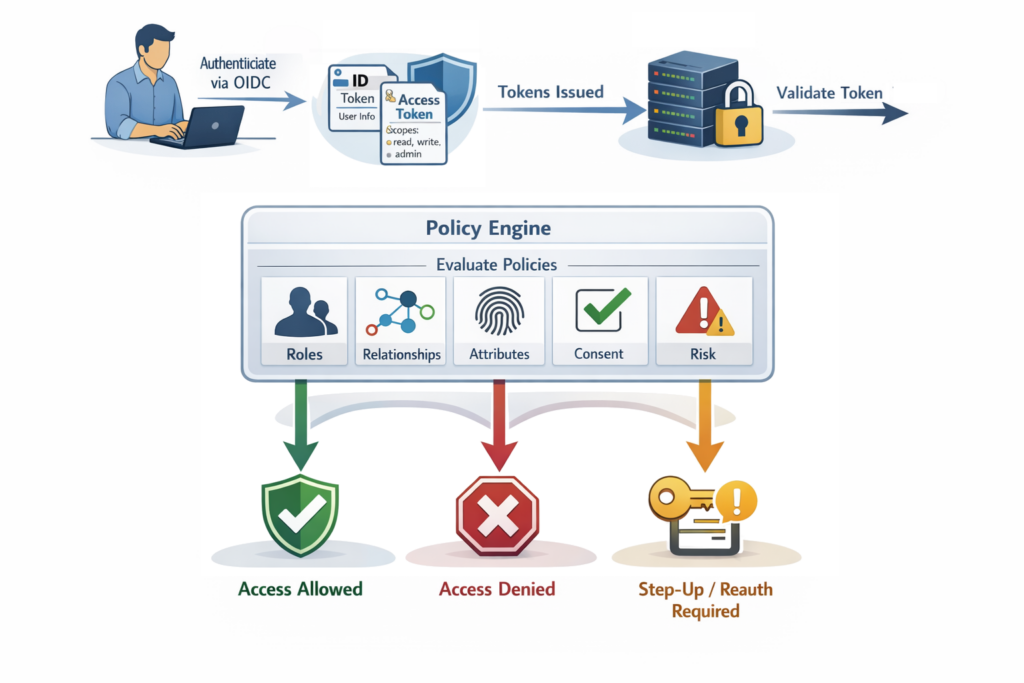
At first glance, they appear similar, and there is certainly synergy between the two. Both relate to access, both are security controls, and both sit within the identity space. However, in reality, they solve two different problems: Authentication essentially answers the question of “Who are you?” whilst, as a corollary, Authorization answers the question of “What are you allowed to do?”
| Authentication | Authorization |
|---|---|
| Verifies identity | Grants approval |
| Executed infrequently | Evaluated repeatedly |
| Based on credentials | Based on policy |
| Token issuance | Permission validation |
| Identity-centric | Context-centric |
Governance — often referred to as Identity Governance and Administration, or IGA for short — also plays a large part. Governance essentially provides process layers that sit above core Authentication and Authorization, particularly in Workforce IAM and B2B CIAM scenarios. I’ll be covering this in more detail in a future article.
In workforce IAM, users are employees, control dominates, and trust boundaries are internal. With CIAM, users are customers, experience dominates, the trust boundary is the public internet and privacy regulations apply.
My name’s Peter Fernandez, and in this article, I’m going to discuss the differences between Authentication and Authorization — exploring some of the concepts that help drive frictionless customer experiences at scale, whilst maintaining privacy and providing security that’s robust yet largely invisible.
Authentication
Let’s start with Authentication — not least because it’s the precursor to anything that’s Auth-related. Authentication is the process of verifying a user’s identity. In a CIAM context, this typically means “you are who you claim to be,” and involves the likes of:
- Username/password credential validation
- Social login (Google, Apple, Facebook)
- Passwordless email links
- WebAuthn / Passkeys
- Biometrics
- SMS OTP
- etc.
Actually, Authentication isn’t just about verifying a user’s identity — what is typically referred to as a Sign-in/Login. But it is what most folks typically associate with the term. Authentication can, however, also refer to the identification of a non-user context. In a modern landscape, this also includes AI agents (acting on behalf of a user) or otherwise. I’ll talk more about this in future articles.
Authentication covers a wide range: from User Authentication at one end of the spectrum to Machine Authentication — typically where the identity of some system-level service is concerned — at the other.
Protocols
Unlike Workforce IAM — where strict controls dominate — CIAM balances the likes of Security, Privacy and Regulatory Compliance, with usability, simplicity and conversion. To achieve this, Authentication in a CIAM context must offer maximum security, low friction, be resilient to abuse, highly scalable, and be capable of operating in an API-first architecture.
CIAM Authentication is typically satisfied via SaaS solutions like Keycloak or third-party providers like Fusion Auth, Clerk, FrontEgg, Auth0, etc. These operate independently of the applications in a typical B2C/B2B ecosystem.
OIDC
Today, OIDC, short for OpenID Connect, is the dominant industry-standard authentication protocol. It’s built on top of the OAuth 2 protocol specification (more about that in the section below) and allows an application — otherwise known as a Client — to verify identity based on the Authentication performed by an Identity Provider (an IdP). It is:
- REST-friendly
- JSON-based
- ID Token centric using JWTs
Whilst systems that use OAuth 2 (discussed below) can also be used to Authenticate, the predominant mechanism is OIDC. This exacerbates misconceptions, particularly if both use JWT as their token format.
OIDC dominates in a CIAM context for a number of different reasons. Being relatively easy to integrate with both Confidential Clients and Public Clients — such as Mobile Apps and SPAs — and supporting the likes of Social Login, too, it’s cloud-friendly (so works well with B2C and B2B type solutions), enables SSO and MFA workflows, and is easily extensible. You can read more about it in my previously published article:
SAML
Prior to OIDC, SAML dominated the federated identity landscape — and to a large extent still does in enterprise federation today. SAML, short for Security Assertion Markup Language, is an XML-based protocol used for exchanging authentication data between parties — typically an IdP or an SP (i.e. Service Provider in the SAML nomenclature).
Federation is the mechanism whereby Authentication can essentially be delegated to an Upstream IdP (from what’s typically referred to as a Downstream IdP). Federation is often used as a shorthand reference to Enterprise Federation, but it can equally apply to Social as well.
Whilst SAML still leverages the concept of an IdP, it works differently to OIDC — crucially, in the respect that it relies on the SAML Assertion (an XML-based document) rather than the JWT format ID Token used in OIDC. Again, you can read more about SAML and the differences between it and OIDC in my article linked above.
Still heavily used in Enterprise SSO scenarios, SAML is often leveraged in B2B SaaS, where (Enterprise) Federation is frequently used. It can also be used in scenarios where highly secure trust relationships are required, and where proprietary, in-house IdP implementations are employed. However, for B2C SaaS solutions, as well as more and more B2B ones, OIDC has largely replaced it as the protocol of choice.
In most SaaS scenarios, applications themselves will almost always make use of OIDC, preferring to integrate with 3rd-party CIAM (SaaS) solutions that will manage upstream SAML requirements.
LDAP
Before federated, token-based authentication became standard, identity was typically directory-based. From this period, three major legacy protocols remain relevant, and it is worth understanding a little of each from a historical perspective. The first of these is LDAP.
Legacy Authentication often relies on proprietary techniques that, in many cases, can be integrated with modern standards via proxy mechanisms. This can offer a temporary stopgap, as illustrated in the article here.
Lightweight Directory Access Protocol (LDAP) can be used to query and interact with directory services like legacy Microsoft Active Directory, Open Directory, etc. When using LDAP, Authentication works by:
- Binding to a directory
- Validating credentials against stored records — typically a UserID & Password.
LDAP is essentially stateful, and being directory-centric is typically focused on leveraging internal-network resources. It lacks support for Federation and has no web-native capability.
Whilst LDAP is rarely utilised in a CIAM context, it is still used in Workforce IAM situations, and can be required as part of (legacy) integration in the Enterprise Federation scenarios common in B2B SaaS.
In almost all cases, integrating with the IdP provided by most (3rd-party) CIAM SaaS solutions will also provide seamless LDAP interaction from an application perspective.
Kerberos
Another older but historically significant approach to authentication, which is based on trusted ticket exchange, is Kerberos. Originally developed at Massachusetts Institute of Technology (MIT), Kerberos was designed to authenticate users securely across distributed networks without the transmission of passwords. In many ways, it can be thought of as the forerunner to the protocols typically used today.
Using a ticket-based authentication model, a user initially authenticates with a KDC (a Key Distribution Centre), which issues a Ticket Granting Ticket (TGT) after validating the user’s credentials. The TGT can then be used to request service tickets for specific applications or services. Because the tickets are encrypted and time-limited, Kerberos reduces the risk of credential exposure and replay attacks, not dissimilar to OIDC or SAML.
The use of Kerberos in B2C SaaS is practically unheard of. However, like LDAP (discussed above), it can still play a role in B2B SaaS scenarios where enterprise identities need to federate with customer-facing systems.
RADIUS
Remote Authentication Dial-In User Service (RADIUS) is a protocol designed for network access authentication. RADIUS uses shared secrets, often integrates with LDAP, and is typically focused on the network-level access typically associated with VPN authentication, WiFi authentication and network access control. In CIAM, it is rarely used, but may appear in:
- ISP infrastructure
- Telecom oriented systems
- Network-based services
RADIUS is primarily classed as a AAA — as in Authentication, Authorization and Accounting — protocol, so leveraged in more than just Authentication scenarios.
MFA
MFA — a.k.a. Multi-factor Authentication, or 2-factor Authentication (2FA) — complements first-factor authentication to provide additional user security. It typically employs an additional user authentication mechanism — also known as a factor — in an attempt to improve the odds of someone actually being who they say they are.
MFA is an excellent deterrent against malicious attacks, where someone else pretends to be a legitimate user, and any number of factors can be combined as part of the user authentication process (and in any permutation, too). MFA can be adaptive, and is frequently used as part of step-up authentication scenarios as well. You can read more about this in my related article:
When using MFA in a CIAM context, the challenge is to combine the use of factors in a way that maximises security whilst minimising impact on usability. Passkeys, for example, provide a first-factor authentication method that seamlessly combines Biometrics as a 2nd factor to provide an intuitive, secure Login experience with minimal friction.
Factor is the term given to any mechanism for user authentication. First-factor authentication, for example, typically refers to the initial Login whilst multi-factor refers to one or more additional authentication mechanism
MFA can also be used to augment the authentication provided by the upstream IdPs used in Social or (Enterprise) Federation scenarios. Even if those systems don’t provide MFA, or if you want to add an additional layer of protection, say, even on top of SSO. Most (3rd-party) SaaS CIAM solutions offer MFA as a flexible implementation that can be added adaptively, in either a step-up manner or as part of the initial Login workflow.
SSO
SSO — Single Sign On — works by leveraging an independent UI, typically via the Browser, to provide application-independent session-level authentication using a trusted (3rd-party) SaaS IdP. When a user goes to log in for the first time, a successful interaction creates a cookie in the context of the IdP; whenever a user is redirected to the IdP for authentication, if there’s already a valid cookie, they’ll simply get redirected back to the application without being prompted for interactive login.
When combined with MFA, participation in interactive step-up authentication scenarios is still possible, even though interactive first-factor authentication is avoided.
SSO significantly reduces interactive authentication, and when leveraged via the likes of (Enterprise) Federation, can even be used to “automagically” fill in user profile details without having to prompt the user; a win-win situation, where less user friction means better adoption of a product. Again, you can read more about SSO in my related article:
Authorization
Where Authentication proves Identity, Authorization determines what that Identity can do (or what can be done on their behalf). Authorization effectively begins immediately after (successful) Authentication ends, and in a CIAM context, essentially equates to “you may do this,” handling the likes of:
- Access control
- API-to-API access
- App-to-API access
- Third-party access
- Privacy-driven consent
- Granular feature permissions
Unlike Authentication, there’s far less in the way of standards when it comes to Authorization. Authorization is more complex — a quick glance at the table of contents for this article illustrates that — primarily because it’s contextual: depending on who you are and what you are trying to do will ultimately determine the authorization mechanism(s) that are brought in to play.
Whilst there is commonly accepted standardisation in terms of terminology, patterns and operational concepts, there is far less in the way of protocol standards for Authorization than for Authentication.
Delegated Authorization
Delegated Authorization allows one party to act on behalf of another, with either explicit or implicit consent, and is enabled by the industry standard OAuth 2 protocol. Despite common misconceptions, which can often lead to misuse, OAuth 2 is not an authentication protocol, but rather is about granting (limited) access to resources.
OAuth 2
As discussed in my previous article “OIDC, SAML and OAuth 2.0” (linked above), OAuth 2.0 was first introduced in RFC 6749, which was published in late 2012. Despite popular misconception, it is the standard protocol intended to deal with delegated authorization when using APIs, not Access Control (discussed below), as some believe.
Services offered by popular (3rd-party) CIAM SaaS providers often bundle IdP and Authorization Server functionality, which again exacerbates misconceptions between OAuth 2 and OIDC — particularly if both use JWT as their token format.
OAuth 2 services are typically provided by what is referred to as an Authorization Server. For example, suppose you log in to a grammar-checking application that works against your Google Docs. As part of your interaction:
- The app redirects you to Google
- You authenticate
- You are shown a consent screen
- You grant permission to access your Google resources
- Google Authorization Server issues an Access Token
- The grammar-checking app uses that token to call Google APIs
If this sounds familiar, then that’s not entirely surprising; what I’ve just described is Grammarly and how it leverages delegated authorization to gain access to the Google Docs resources in order to perform grammar checking on your behalf 😎
Whilst many 3rd-party CIAM SaaS providers do bundle IdP and Authorization Server functionality, solutions like Authlete and Ory Hydra typically function as discrete Authorization Servers that leverage additional IdP functionality.
Consent
Consent is a central aspect of Delegated Authorization, and essentially becomes part of authorization Policy in general (more about Policy a little later). An integral part of OAuth 2, it is the mechanism by which users have direct input on what is being done on their behalf and is key to achieving regulatory compliance (such as GDPR, etc). In a CIAM context:
- Consent must be explicit
- Consent must be revocable
- Consent must be auditable
- Consent must be granular
In many SaaS scenarios, Consent may be implied based on the Authentication mechanism used. For B2B SaaS, as an example, using Enterprise Federation may imply certain consent, so explicit user interaction is not required.
In the above grammar-checking example, for instance, you, the user, would explicitly interact with the Google Consent dialogue to delegate authorization to the application acting on your behalf. Such delegation would likely include you authorising access to:
- Read your Email Address
- Read your Basic Profile
- Search your Google Drive contents
- Read and update your Google Docs
Modern CIAM platforms typically track what was consented to, when, under what circumstances, and for what purpose. My previous article, linked below, discusses this in more detail:
Access Control
Beyond Delegated Authorization lies access control — the “magic” determining what a user can actually do (in addition to what they have consented to be done on their behalf). Access control typically comes configured via a number of different models, and whilst I will touch on some of the more common ones below, you can read more in my article:
Models effectively provide different arrangements for which permission can be defined at scale; as the more frequent operation, any evaluation of access ideally needs to be as fast and efficient as possible.
Access Control also falls into two distinctive categories. Mandatory Access Control (MAC) — the most common form — is where access permissions are determined by a central authority, and cannot be modified by users. MAC is often based on predefined policies that specify what users and systems can access based on varying factors.
In contrast, Discretionary Access Control — a.k.a. DAC — offers the owner of a resource the discretion to determine who can access it and to what extent. This allows users or groups to share access (as part of delegation or otherwise) to resources based on personal preferences.
Each differs in terms of how access permissions are granted and how rules are applied to manage user interactions with resources. Each comes with its own set of benefits and challenges, and they can be deployed in various combinations to achieve the desired outcome.
ReBAC
Relationship-based Access Control is a paradigm whereby access is defined by relationship(s) between various objects — e.g. individual users and the resources provided. It can be used to model extremely complex scenarios, providing a fine-grained approach to access control, that can also be used to emulate many of the capabilities provided by RBAC, ABAC or the other models, facilitating:
- Access determination at a Relationship level
- Access determination at a Record level
- Access determination at a Field level
Modern Authorization systems, like OpenFGA or third-party providers like Permit.io, offer ReBAC solutions that integrate either stand-alone or in conjunction with modern IdP/Authorization Server solutions.
Using relational modelling — namely, graph-based organisation with object-level permissions — ReBAC enables the kind of Authorization capability that is critical for things like Marketplace functionality, B2B SaaS solution management, and B2C social-style platforms. By way of example, ReBAC facilitates capabilities such as:
- User who can only view their own orders
- User that can edit profile but not account status
- Support agent who can view orders only from assigned region(s)
RBAC
Role-Based Access Control (RBAC) assigns permissions based on the roles users hold within an organization, and is the classic model with which most are familiar. Instead of managing individual permissions, administrators assign users to specific roles, and each role has a set of permissions linked to it; with access to resources being determined based on these roles.
Popular (3rd-party) CIAM SaaS providers often bundle rudimentary RBAC as part of IdP functionality, which can further blur the distinction between what is Authentication and what is Authorization.
RBAC can be highly effective in B2B scenarios for segmenting usage based on different use cases or subscription levels. RBAC simplifies access control management by organising users based on their role rather than managing permissions individually. For example, users with an “administrator” role might have access to features or data which “user” level roles do not. In a CIAM context, this can be used to facilitate authorization across the likes of:
- Subscription tiers
- Admin consoles
- Feature access
- etc.
ABAC
Attribute-Based Access Control (ABAC) enables access decisions based on a wide range of attributes, including user characteristics, environmental conditions, and resource properties. These attributes can include things like time of day, location, device used, user consent, and more.
Combining ABAC with RBAC or ReBAC, for example, can be highly effective in a CIAM context, providing a dynamic approach to access control based on real-world characteristics. For instance, let’s suppose access to a resource was requested by a user with a Gold subscription level, from the UK, during business hours, a corresponding policy might say:
Allow access if within business hours AND subscription = Gold AND region = UK
Use of ABAC supports dynamic, context-aware and increasingly fine-grained control of access, that can provide for things such as:
- Regional compliance
- Dynamic pricing
- Tiered services
- Fraud control
CBAC
CBAC, otherwise known as Context-based Access Control (or Contextual Access Control), takes ABAC a step further by considering the supplemental context of an access request. This could include situational factors such as the user’s past behaviour, current status, or even the type of operation being performed.
PBAC
Policy-Based Access Control, or PBAC for short, is an access control paradigm where Authorization decisions are driven directly by (dynamic) policies — the discrete, evaluable rules that form the basis of all Authorization decision making (see below for more details) — rather than augmented by static Role assignments or resource ACLs.
Unlike the other models, PBAC doesn’t define a permission collection per se, but rather operates at the policy level, which itself can consume permission(s) independently.
PBAC is often positioned as a superset of RBAC and ABAC: Roles can be modelled as policy inputs, and attribute conditions can be embedded in policy rules — so it subsumes both without being tied to either paradigm’s structural constraints.
The practical appeal of PBAC is flexibility and auditability — policies are explicit, versionable artefacts that can be tested and reviewed independently of application code. The tradeoff is governance overhead: as policy sets grow, keeping them coherent and conflict-free becomes a non-trivial engineering challenge.
ACLs
Access Control Lists, abbreviated ACLs for short, can be used as a supplement to define lists of who can access specific resources and what actions can be performed. In a CIAM context, ACLs are used as input to policy and can also be used in combination with the various access control models discussed above.
An ACL is typically comprised of a number of Access Control Entries (or ACEs for short), with each ACE explicitly permitting or denying access to users/groups. ACLs come in various types — Discretionary Access Control Lists (DACLs) and System Access Control Lists (SACLs) being the most commonly utilised — and are explained in more detail in my previously published Access Control article linked above.
Policy
Policy is the general term given to the decision-making process within the world of Authorization. At its heart is the idea that some policy “engine” — driven by a set of dynamic and/or static rules — is used to evaluate a set of conditions: who is asking permission, what they want to do, what resource is involved, etc. (often with contextual factors like time, location, or device state being included in the equation).
The outcome of policy evaluation is essentially a permit or deny decision, sometimes with obligations attached (such as the required use of MFA, Step-up Authentication, Re-authentication, etc). A policy will often consider aspects such as:
- Subscription level
- Geography
- Risk score
- Device trust
- Behavioural anomalies
- etc.
Policy leverages both Consent and Access Control, in whatever combination is required, evaluating the express permissions defined to achieve the resulting outcome. Commonly written declaratively — in as complex or as simple a manner required, combining permission evaluation with functional logic — for compliance and auditing, policies are typically versioned, testable, and auditable. For instance, a statement like:
IF role = “Admin” THEN grant delete
or
IF user_id = resource_owner THEN allow edit
forms a simple policy logic that will either permit or deny operation. This can be combined with more complexity that requires elevation of privilege, such as via Step-up Authentication or the like:
IF risk_score > 70 THEN require MFA
Even the simplest policy logic can quickly become difficult to manage, especially as systems grow and numerous policies are defined. Solutions like Open Policy Agent (OPA), for example, typically make policy easier to manage.
Policy within any IAM integration is used for permission evaluation across numerous aspects, including such things as API Authorization, Microservices Authorization, and, of course, in support of Zero-trust architecture. Solutions like Open Policy Agent (OPA) and Cedar are examples that provide more complex policy processing management.
OpenFGA sits in related territory, though it is primarily considered a ReBAC solution (as discussed above).
Permission
At the core of Authorization lies the concept of Permission. Permission — or more precisely “Permissions”, as there’s typically more than one — represent the explicit right to perform a particular action on a specific resource, and are typically defined as an action–resource relationship, such as:
read:ordersedit:profile, ordelete:document
Whilst there is no standard for permission definition per se, the generally accepted patterning is <action>:<resource>, or in certain cases, <resource>:<action>
Permissions are essentially atomic rights — as in create, view, update, edit, delete, share, etc. — and often follow a CRUD pattern (as in Create, Read, Update and Delete) for a resource. When a user — or more specifically the “subject” in question — attempts to perform an operation, evaluation via the use of Policy determines whether he/she/it possesses the right to perform the desired action on the designated resource.
Such evaluation may be direct — where permissions are assigned directly to the user/subject — or indirect, where permissions are inherited through access control models, groups and/or direct policy logic. By carefully defining and assigning permissions, systems can ensure that only the capabilities genuinely required are granted, reducing risk while enabling secure and scalable Authorization. The table below gives some examples of how this granularity of Authorization can vary at different levels within a system:
| Level | Example |
|---|---|
| Application | Can access the dashboard |
| Function | Can delete account |
| Feature | Can use export function |
| Resource | Can view invoice #123 |
| Field | Can see salary field |
Granularity
Permission granularity refers to the level of detail at which permissions are defined and enforced within an Authorization system. This, in turn, determines how precisely authorization rights can be controlled over actions and resources.
At one end of the spectrum are coarse-grained permissions, where a single permission may grant broad access to an entire system or dataset, such as admin:all or read:reports. While simple to manage, coarse permissions often risk granting users more access than they actually require.
At the other end are fine-grained permissions, which break rights down into very specific action–resource combinations. For example, a system might distinguish between read:order, update:order_status, and refund:order. In such cases, permissions may apply not only to a type of resource, but to specific characteristics of that resource — for instance, allowing a user to update only the orders they created or view only certain attributes within a customer profile.
Granularity plays a crucial role in achieving what is typically referred to as the Principle of Least Privilege (discussed in more detail below). However, increased granularity also introduces greater complexity in management and policy evaluation. Effective Authorization, therefore, seeks to strike a balance where, ultimately, well-designed permission granularity enables precise, scalable, and context-aware access control without overwhelming administration.
Privilege
Within the Authorization context, Privilege refers to the level of access or control that a subject — typically a user, or some service-level process — has over a particular resource. While permissions describe the specific actions that can be performed, privileges represent the broader authority to perform higher-risk or more sensitive operations within a system.
Traditionally, the province of B2E solutions, Privilege has become an important factor in B2B SaaS Solutions where integration with corporate systems and administrative policies is commonplace.
Privilege often includes administrative capabilities such as modifying configurations, managing other users, accessing sensitive data, or executing system-level commands. Because these capabilities can have a significant impact on security, stability, and data protection, privileges must be carefully governed within a security-robust Authorization ecosystem.
A fundamental concept in managing privilege is the Principle of Least Privilege (PoLP). This principle states that a subject (i.e. user, process, etc) should be granted only the minimum level of access required to perform its intended function — and nothing more. By limiting privileges in this way, organisations reduce the potential attack surface and minimise the damage that can occur if credentials are compromised or misused.
For example, a customer support agent may require permission to view account details but should not necessarily have the privilege to modify system configurations or access financial records. Implementing least privilege typically involves access control that facilitates granular permission definitions with policies that ensure privileges are tightly aligned with job responsibilities.
PAM
Privileged Access Management, or PAM for short, helps protect organisations against cyber threats by monitoring, detecting, and preventing unauthorised privileged access to critical resources. PAM works through a combination of people, processes, and technology and gives you visibility into who is using privileged accounts and what they are doing while they are logged in. Limiting the number of users who have access to administrative functions increases system security, while additional layers of protection mitigate data breaches by threat actors.
Certain operational tasks inevitably require elevated privileges. System administrators, DevOps engineers, database administrators, and automated infrastructure services often need higher levels of authority to maintain and operate systems. PAM solutions are designed to control, monitor, and audit the use of privileged accounts; instead of permanently assigning high-level privileges, PAM systems often implement mechanisms such as just-in-time privilege elevation, session monitoring, and detailed activity logging.
In practice, PAM reduces risk by ensuring that privileged access is granted only when necessary and for a limited duration. For instance, an administrator may request temporary elevated privileges to perform a maintenance task, which are automatically revoked once the task is completed. Additionally, PAM systems frequently rotate privileged credentials, preventing direct knowledge of sensitive information by individual users.























Leave a Reply